Hey All! I understand there are some questions regarding sharing files as "View Only"
The first thing to remember is that the name of the drive indicates who is responsible, not just who has access.
Let's use PHS as an example. If you put a file in the PHS Teachers Shared Drive:
PHS Teachers have access to this as "content managers"
meaning they can edit or delete anything you put in here.
There's no
way to further restrict things if the whole drive has already been
shared with them, however...
What you can do (bearing in mind who is responsible for the file or folder, place it somewhere more appropriate, like the PHS Admin Drive.
 image.png
Next, I will create a shortcut to this file, and place the shortcut in the PHS Teachers Drive.
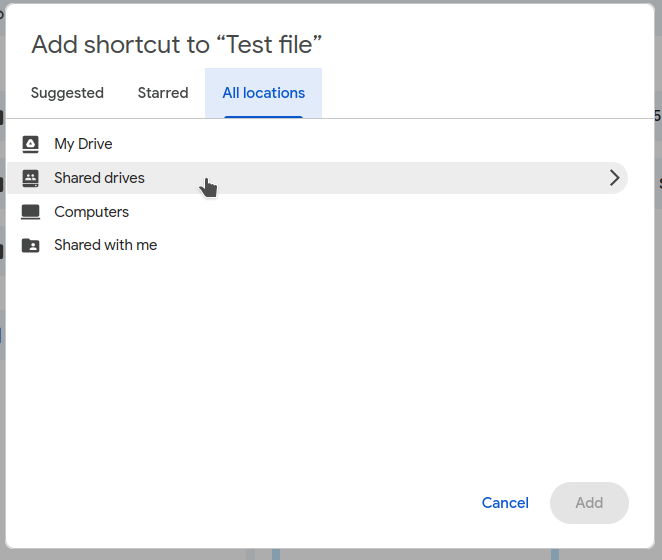
Then
I'll be asked to give access to everybody who has access to the PHS
Teacher's Drive. I'll make sure the dropdown is set to "Viewer" and
click "Add Shortcut":
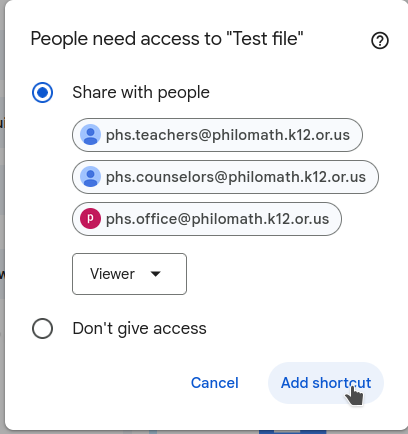
Here's what that shortcut looks like:
Now
people in the PHS Teachers group can see the shortcut, they can view
the file, but they cannot edit or delete it, and the file is technically
in the PHS Admin Drive, and
Ext. #1700